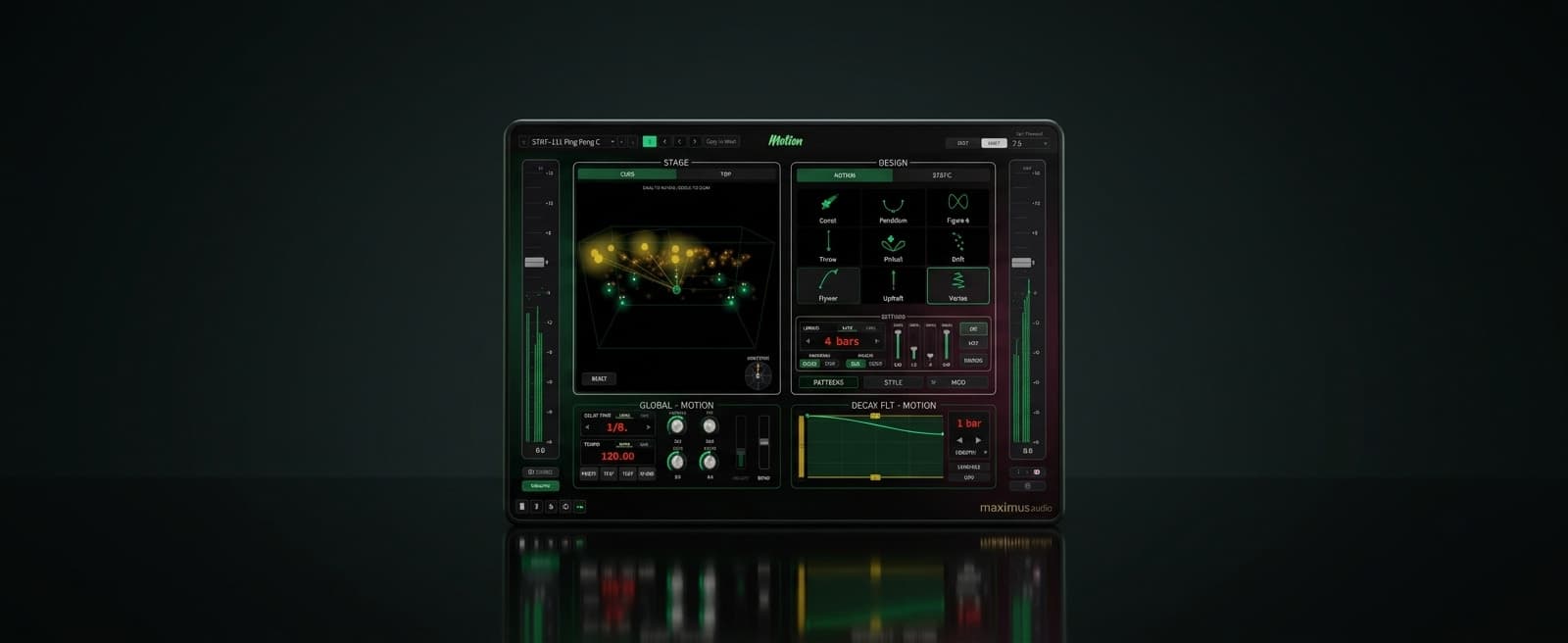
Mot1onDual engine, immersive flying delay!
Features
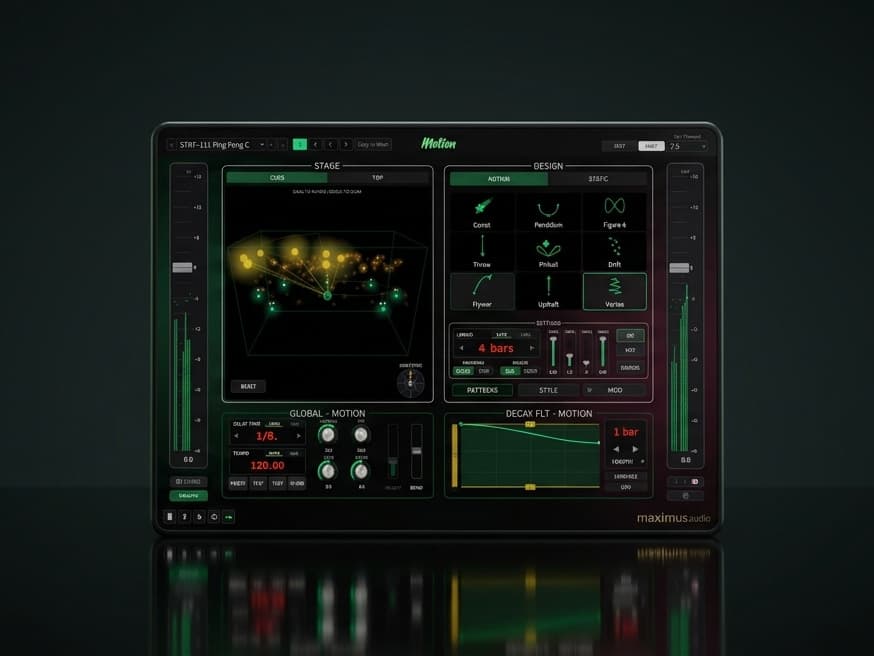
- Two independent engines: MOTION (moving source) and STATIC (multi-tap)
- Nine motion shapes including Comet, Vortex, Pinball and Flyover
- Up to 16 placed taps, each an echo positioned anywhere on the dome
- 20+ tap layout presets: rings, spirals, stars, grids and sweeps
- Twelve delay voices including Tape, Bucket Brigade, Dub and Shimmer
- Modulation on the tail: flange, phaser or chorus
- Moving DECAY FILTER that sweeps the tail tone over time
- BEND analog-style varispeed for tape-flutter pitch dips
- SWING and POCKET for groove and feel against the grid
- Per-tap TIME, FEEDBACK and height overrides
- DIRECTION dial spins the whole spatial field, fully automatable
- MULTI IN preserves each input channel's own position
- Output up to immersive 9.1.6
- Ambisonic encoding from 1OA to 7OA
- 3D CUBE and top-down TOP stage views
- FREEZE - Freeze a buffer of delay and play it indefinitely until disengaged.
- AU, VST3 and AAX for macOS and Windows
- Easy Mode - stripped down UI that can still use all of the included presets for inspiration
- Multi Language Tooltips - Now available in 22 different languages
- Randomizer - roll the dice to randomise all settings
Video Walkthrough
This demo showcases spatial audio. Choose your listening setup for the best experience.
Choose your listening setup above to get started
This demo features spatial audio. Selecting headphones, surround speakers, or stereo ensures you hear the best version for your setup.
Mot1on - Surround, Immersive and Spatial Delay Plugin for Atmos and Surround Mixes
Most delays repeat the sound in the same place. Mot1on can place each repeat at a different position around the room, so a single source spreads across the whole speaker layout and the tail travels as it decays.
A delay that moves.
Mot1on is a surround delay plugin and an immersive delay plugin in one: a spatial delay plugin built for spatial workflows. Use it as a delay plugin for surround beds, as a delay plugin for Atmos and immersive mixes, or as a creative effect on a stereo bus. It runs from mono and stereo up to full 9.1.6, and also supports up to 7th order ambisonics. There are two modes to move the echoes, and Mot1on keeps a complete, independent setup for each.
MODE 1: MOTION: a moving-source delay
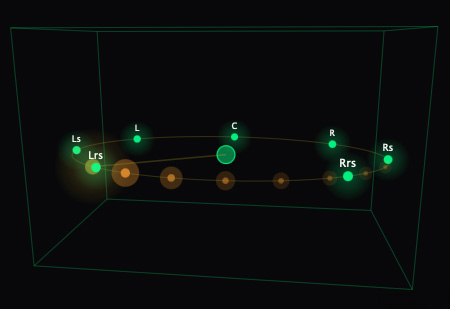
MOTION mode turns your dry signal into a point that travels a path around the room, with the echoes trailing behind it like a comet tail. Pick a shape, set how fast it laps, and the whole delay sweeps through the speakers. At first glance you might think this is possible by simply using a mono delay and a spatial auto-panner, it's not, because this way the delay will spawn where the source is, not where it was.
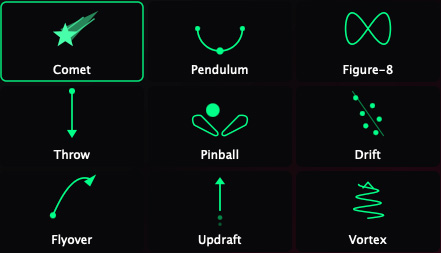
Nine shapes. Comet, Vortex, Updraft, Pendulum and Figure-8 orbit the room. Throw and Flyover travel from one place to another. Drift wanders. Pinball bounces in straight lines, reflecting off the walls, and off the floor and ceiling once height is raised.
Glide or Step. Move smoothly and continuously, or hop one position per repeat so the movement locks to the delay grid.
Sustain or one-shot. Let the echoes trail the source continuously, or send a single hit and its repeats traveling the path together as one gesture, ideal for stabs and sparse percussion.
Direction. Travel clockwise, counter-clockwise, or ping-pong back and forth.
Rate. One lap per tempo division in sync, or a free rate in Hz.
Width, Height, Trail and Turns. Size the path, lift it into the height speakers, set how far the comet tail reaches, and add windings or bounce density.
Stereo width. A stereo source keeps its image, traveling the path as a left and right pair spread to taste instead of collapsing to a single point.
MODE 2: STATIC: a multi-tap delay you place by hand
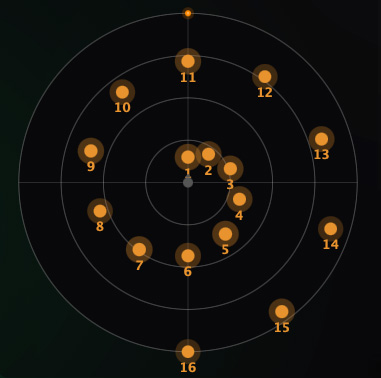
STATIC is a more traditional type delay that gives you up to sixteen taps, each an echo at a fixed spot around the room, played in the order you choose. This is the heart of Mot1on as a delay plugin for surround: build a bed of echoes exactly where you want them across the layout.
Place taps directly on the top-down dome: click to drop, drag to move, hover and click to remove.
Speaker or Free. Pin every tap to a real speaker for a clean bed, or place taps anywhere and let them pan to position. Snap keeps free taps aligned to the grid and speaker points when you want it.
Layout presets arrange all taps at once: rings, spirals, stars, crosses, grids, sweeps, pinwheels and a speaker bed.
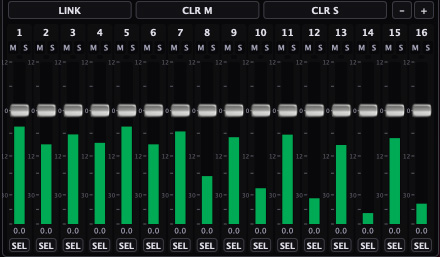
Tap mixer with per-tap level, mute, solo, drag-to-reorder, link and clear. Select several taps at once with Ctrl-click or a Shift-range, then set their level, mute, solo, timing, feedback and height together.
Per-tap overrides. Any tap can break away from the global timing with its own delay division, feedback and fixed height, becoming an independent echo voice.
The voice of the tail
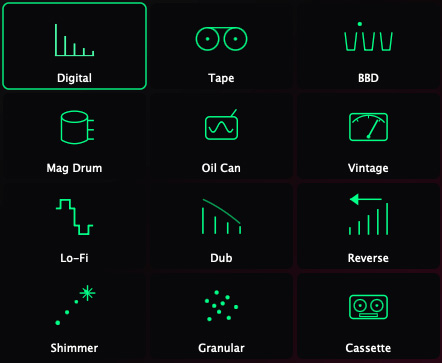
STYLE sets the character of the echoes without changing where they land. Twelve voices, always on and independent per engine: Digital is transparent and neutral, while Tape, Bucket Brigade, Magnetic Drum, Oil Can, Vintage Digital, Lo-Fi, Dub, Reverse, Shimmer, Granular and Cassette each color the tail in the manner their name suggests. The analog voices degrade with every repeat, just like the real machines, so the tail grows darker and more worn the longer it rings rather than sitting at one fixed tone.
Modulation on the wet
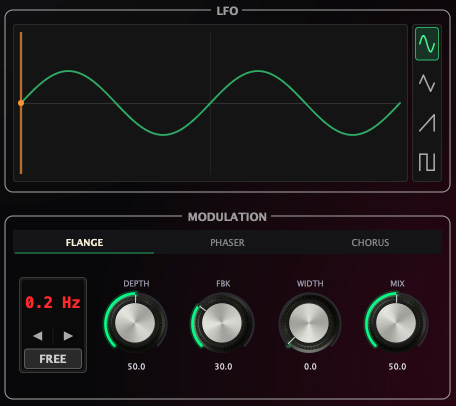
MOD adds a flange, phaser or chorus to the delay tail, with its own settings per engine. The LFO syncs to tempo or runs free, with sine, triangle, saw and square shapes, plus depth, feedback, cross-channel width and wet mix.
A tail tone that moves
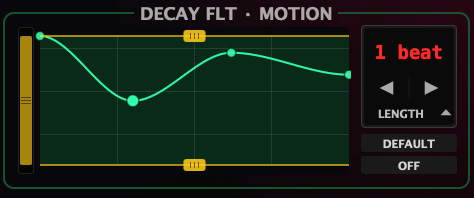
DECAY FILTER is a low-pass that sweeps over the delay loop, so the tail can travel from bright to dull, or any curve you draw. Set up to five breakpoints over the loop, choose the loop length, and use the LO CUT and HI CUT bars to size the frequency band the curve sweeps within, which also high-pass and low-pass the wet so the tail stays in its lane. The tail evolves as it repeats instead of sitting at one static tone.
Timing, groove and pitch
Set the delay time in tempo divisions from 1/32 to 64 bars, or in free milliseconds, with tap tempo on hand. SWING lengthens every other repeat for groove, and POCKET pulls the repeats late and laid-back or pushes them early and ahead. BEND is an analog-style varispeed: pull down to lengthen the delay and dip the pitch, push up to shorten and lift it.
Freeze
FREEZE captures a slice of the tail and loops it for as long as you hold, then locks it so the delay sustains that phrase under whatever you play next. Press again to let it go. It is fully automatable, so you can catch a moment and build on it live or from your DAW.
Spin the whole field
The DIRECTION dial rotates the entire spatial layout around the listener, a full 360 degrees. In MOTION it turns the path and its tail, in STATIC it spins the freely placed taps. It is fully automatable, so you can orbit the field over time from your DAW.
Keep a stem's own layout
MULTI IN keeps each input channel at its own speaker position instead of folding the input down to one source, so each channel gets its own delay whose echoes stay where that channel lives. Ideal for surround stems where you want the input's spatial image preserved.
Presets, and a workflow that stays out of the way
Mot1on ships with 200 factory presets, split evenly between the two engines: bread-and-butter surround delays, slaps and dubs, resonant short-time textures, ambient washes and bold movers, all a starting point for your own. Flip between four A/B/C/D slots to compare setups, and lock the delay time while you audition.
EASY mode for quick setups
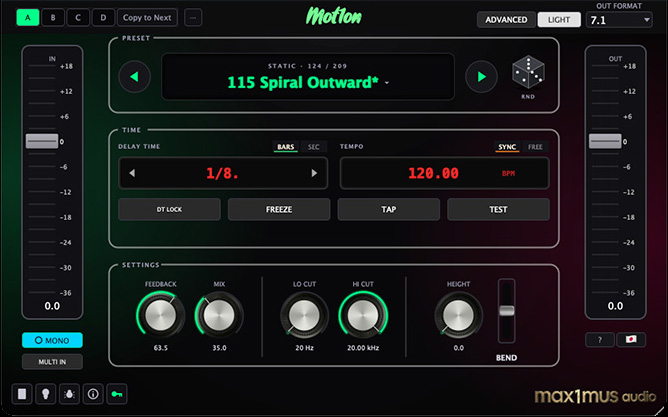
EASY mode strips the interface back to the handful of controls you reach for most, so you can load Mot1on, pick a sound and move on. When you want to go deeper, switch to the full view for every mode, tap, filter and modulation control. Both views drive the same engine, nothing is lost by working in EASY, you are just seeing less of it at once.
Built-in help in 22 languages
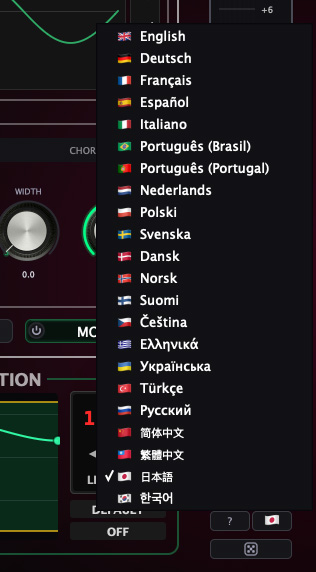
Every control in Mot1on carries a built-in tooltip that explains what it does and how it shapes the sound, so you can learn the plugin without reaching for the manual. The help is available in 22 languages: pick yours and hover any control to read what it does in the language you think in.
Format support
Mono, stereo and multichannel input. Output beds from 1.0 and 2.0 through 5.1, 7.1 and 7.1.4 up to immersive 9.1.6, flat or with 2, 4 or 6 height speakers, plus ambisonic encoding from 1OA to 7OA for binaural, VR and downstream decoding. LFE passes straight through untouched, and delay is never sent to the low-frequency channel. AU, VST3 and AAX. macOS Apple Silicon and Intel, and Windows 10/11.
Plugin Formats
DAW Compatibility
System Requirements
A surround-capable DAW macOS macOS 14 (Sonoma) or newer · Apple Silicon and Intel · AU, VST3, or AAX host Windows Windows 10/11 (64-bit) · VST3 or AAX host · Intel/AMD CPU (SSE2)